

Technical SEO Tools: Which Ones Matter and How to Use Them Effectively
Technical SEO tools are essential, but they are often misunderstood. Many teams collect them faster than they learn how to interpret them. A crawl tool finds thousands of warnings, a performance tool flags red scores, a dashboard shows indexing shifts, and suddenly the website looks broken from every angle.
The problem is not the tools themselves. The problem is using them without a clear framework. Technical SEO tools are useful when they help you understand how search engines crawl, index, and evaluate a site. They become far less useful when they generate noise without helping you decide what actually matters.
That is why this topic deserves a more practical explanation. The right tools can help you diagnose crawl issues, uncover duplication, improve performance, validate structured data, and prioritize technical fixes. But no tool replaces strategic interpretation.
This article explains what technical SEO tools are, why they matter, how they work, which categories are most useful, what people often get wrong, and how to build a smarter toolkit.
What Are Technical SEO Tools?
Technical SEO tools are platforms, crawlers, validators, and monitoring systems that help identify issues affecting how search engines access, understand, and process a website.
In practical terms, they help answer questions such as:
- Can search engines crawl this site properly?
- Are important pages indexable?
- Are there technical contradictions across canonicals, redirects, and sitemaps?
- Are there performance problems affecting page experience?
- Is the site generating duplicate or low-value URLs?
- Are structured data and mobile rendering implemented correctly?
Technical SEO tools do not optimize a site automatically. They surface data, reveal patterns, and support diagnosis. The value comes from the decisions made after the data is reviewed.
A good toolset usually spans several functions rather than relying on one platform to do everything.
Why Technical SEO Tools Matter
Technical SEO tools matter because many technical problems are difficult to spot manually. A site may look fine in a browser while still sending poor crawl signals, creating duplicate URLs, or exposing broken templates across hundreds of pages.
They reveal issues at scale
A single page can be reviewed manually. A site with hundreds or thousands of pages cannot. Technical SEO tools help detect patterns across templates, directories, parameter behavior, status codes, and internal linking.
They improve prioritization
A strong toolset helps you separate minor cleanup tasks from issues that affect real SEO outcomes. That includes blocked pages, broken canonicals, index bloat, weak internal structure, or performance problems on key templates.
They support ongoing monitoring
Technical SEO is not static. Site changes, migrations, plugins, CMS updates, and template edits can all create new issues. Tools help teams monitor the site over time rather than only reacting after traffic drops.
They connect technical observations to SEO strategy
When used well, technical SEO tools support better strategic decisions. They help clarify which page types need improvement, which technical systems are misaligned, and where the site is losing efficiency.
How Technical SEO Tools Work
Technical SEO tools work by collecting technical signals from the site and presenting them in a way that supports diagnosis.
Different tools use different methods.
Crawlers simulate site discovery
Crawl tools follow internal links, inspect metadata, record status codes, and reveal how the site is structured. They are especially useful for spotting orphan risks, duplicate patterns, redirect chains, noindex usage, and page depth issues.
Performance tools assess speed and stability
These tools test how pages load, render, and respond across devices and conditions. They help identify Core Web Vitals problems, render-blocking resources, oversized images, and JavaScript issues.
Search platform tools reflect search engine feedback
Tools like Google Search Console offer direct signals about indexing, coverage, usability, and page performance. They often reveal issues that third-party tools cannot fully replicate.
Validators check specific implementations
Structured data validators, mobile tests, and sitemap checks help confirm whether particular technical elements are working as intended.
The key point is that every tool sees the site from a slightly different angle. That is why interpretation matters more than any single report.
Core Categories of Technical SEO Tools
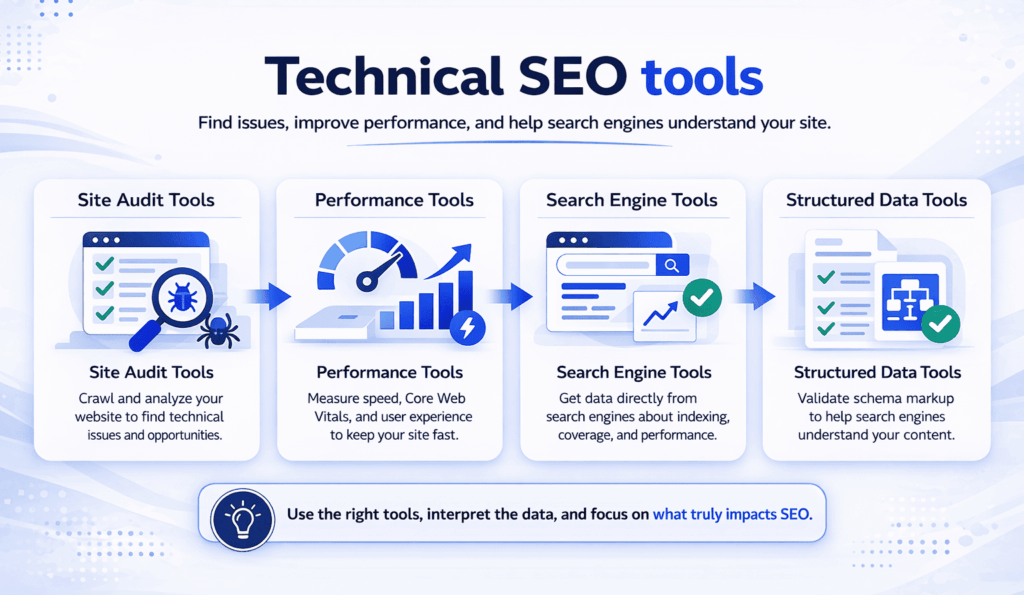
Crawl and site audit tools
These are often the foundation of a technical SEO toolkit. They help surface structural and template-level issues across the site.
Typical use cases include:
- identifying broken links
- finding redirect chains
- reviewing canonicals
- spotting duplicate metadata
- auditing internal linking
- checking crawl depth
- identifying status code issues
A crawl tool is often where a technical SEO audit begins.
Search engine feedback tools
These tools show how the search engine itself is interpreting the site. They are critical because they move the analysis beyond simulation and into real indexing and search behavior.
They are especially useful for:
- indexing status
- coverage issues
- sitemap submission review
- page experience signals
- query and page visibility trends
This category is especially important because it helps validate whether technical fixes are being reflected in actual search behavior.
Performance and Core Web Vitals tools
Performance tools help diagnose whether pages are slow, unstable, or unresponsive. They are central to topics like website speed SEO and Core Web Vitals.
These tools help evaluate:
- loading speed
- responsiveness
- layout stability
- resource weight
- render-blocking assets
- mobile performance
They are most useful when focused on important templates rather than random isolated URLs.
Structured data and validation tools
Structured data tools help verify whether markup is valid, relevant, and aligned with the visible page. They can reveal missing required properties, invalid schema types, and implementation issues.
This category is especially useful on sites that rely on article, product, FAQ, organization, or breadcrumb markup.
Log and server analysis tools
These are more advanced, but often valuable on larger or more complex sites. They help analyze how search engine bots are actually crawling the site, which pages receive attention, and where crawl waste may be happening.
They are especially useful when crawl budget, indexation efficiency, or large-scale template behavior becomes a concern.
Important Technical SEO Tools by Use Case
Rather than focusing on brand names alone, it is more useful to think in terms of what each tool should help you do.
For crawl analysis
You need a crawler that can map the site, inspect page directives, review status codes, and expose structural problems across many URLs.
For indexation and real search feedback
You need direct visibility into what the search engine is indexing, excluding, or flagging.
For performance evaluation
You need a way to review page speed, Core Web Vitals, mobile rendering, and template-level performance weaknesses.
For structured data validation
You need tools that can confirm whether your markup is valid and whether it matches the visible content.
For ongoing technical monitoring
You need a process, supported by tools, that helps you catch changes over time rather than relying on one-off audits.
Common Mistakes With Technical SEO Tools
Using too many tools without a clear framework
A larger stack does not automatically create better diagnosis. It often creates more noise unless each tool has a defined purpose.
Treating tool warnings as strategy
Not every warning deserves action. Many technical SEO tools surface issues mechanically. The job is to understand which ones affect crawling, indexing, page experience, or important templates.
Trusting one tool as the source of truth
Every tool has blind spots. Crawl tools simulate. performance tools sample. search tools reflect a narrower set of reported issues. Good diagnosis usually requires comparing signals across systems.
Focusing on easy metrics instead of meaningful ones
It is common to spend too much time fixing cosmetic issues because they are easy to export and track. Meanwhile, more important issues such as weak internal linking, poor canonicalization, or index bloat remain unresolved.
Reviewing isolated pages instead of templates
Many issues are systemic. If one page is slow because of a shared script bundle, the real problem is not that page. It is the template or component affecting many pages at once.
Practical Guidance for Building a Better Toolkit
The best technical SEO toolkit is not the biggest one. It is the one that helps you answer the right questions consistently.
Start with a small, practical setup that covers these needs:
- one crawl tool
- one source of direct search engine feedback
- one performance analysis workflow
- one structured data validation process
Then build from there only when the site’s complexity justifies it.
It also helps to organize tools around business priorities. For example, if the site relies heavily on content clusters, your tool usage should help validate internal linking, crawlability, indexation, and page experience across those pages. If the site is ecommerce-heavy, duplication, canonicalization, filters, and structured data may deserve more attention.
This page also connects naturally to related topics such as technical SEO audits, crawling and indexing, website speed SEO, Core Web Vitals, structured data SEO, canonical tags, and XML sitemap SEO. In a cluster model, those pages can each go deeper while this article stays focused on the toolset itself.
Timing and Expectations
Technical SEO tools can surface issues immediately, but their business value depends on how the findings are prioritized and implemented.
Some tools help identify quick fixes, such as broken internal links or sitemap errors. Others reveal structural issues that take longer to resolve, such as duplicate URL generation, bloated templates, or crawl inefficiencies.
It is also important to stay realistic. A better tool stack does not improve rankings by itself. It improves your ability to identify technical problems clearly and fix them with better judgment.
That is where the real value lies.
Conclusion
Technical SEO tools matter because they make complex website behavior visible.
They help uncover crawl issues, indexing problems, duplication patterns, performance weaknesses, and structural inconsistencies that are difficult to spot manually. But tools alone are not the strategy. Their value depends on interpretation, prioritization, and alignment with real SEO goals.
The smartest approach is to use a focused set of tools that helps you understand how the site works, where technical friction exists, and which fixes will actually move the site forward. For websites building long-term topical authority, that kind of clarity is far more valuable than a long list of dashboards.